
TL;DR
I rebuilt FeralUI's Stamp animation in Flutter without any animation packages. The whole thing runs off one AnimationController, and each part of the animation reads its own slice of it through Interval. The 3D stamp is about 110 rounded rectangles stacked on top of each other, like a pile of coins. Most of my bugs were tiny: a missing minus sign, two missing pauses, an easing curve applied twice, a sound that played over another sound, and two widgets in the wrong order.
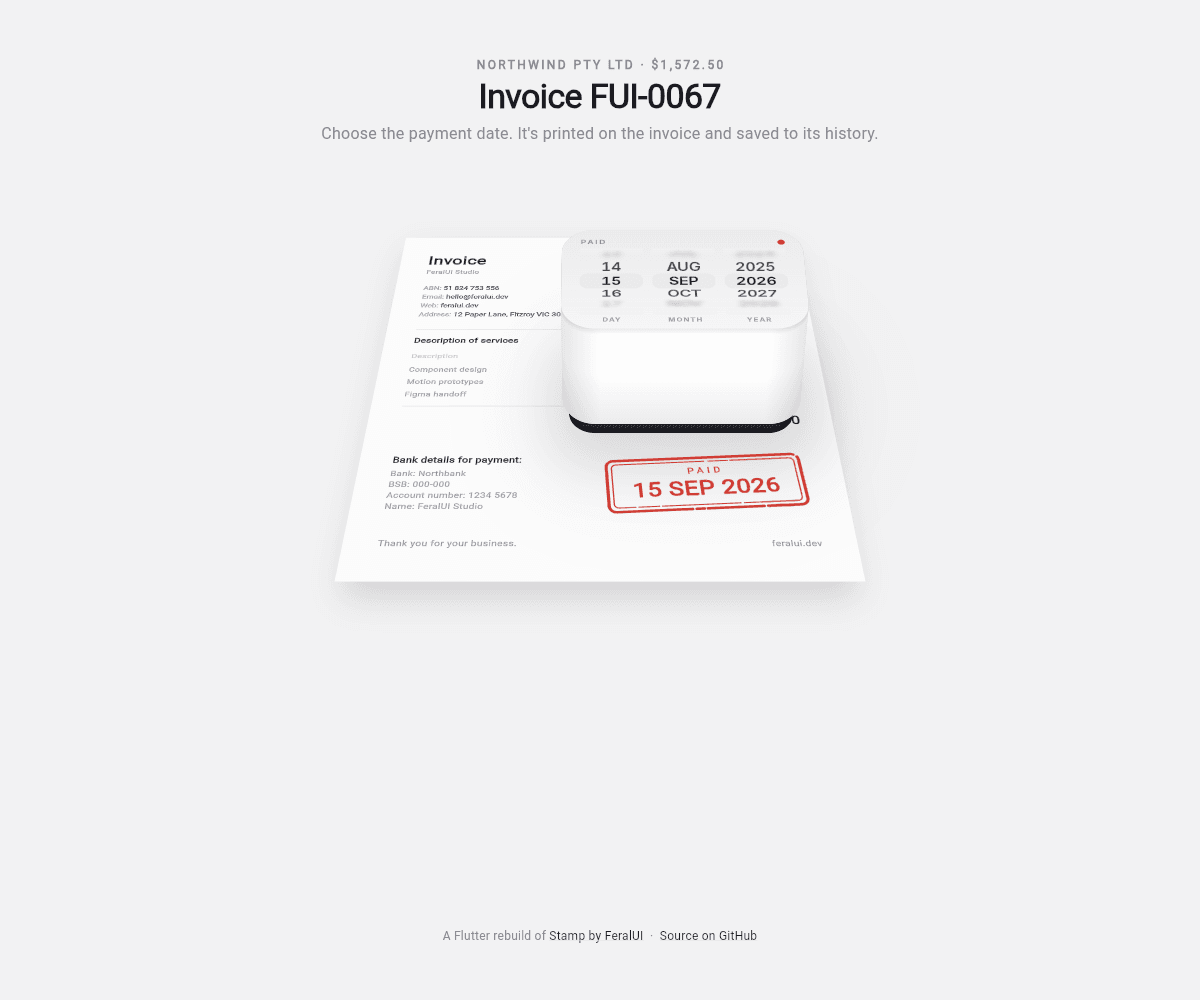
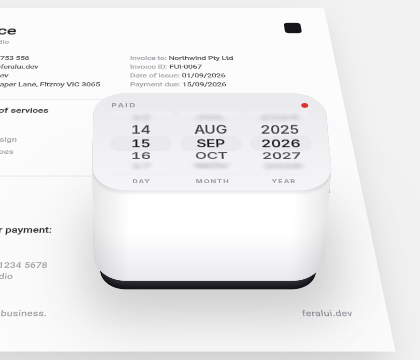
I came across a post on X by @SolutionB2u showing Stamp, a component from FeralUI. It's a date picker for invoices. You roll the date on the face of a rubber stamp and press a button. The page tips back, the stamp comes down on it with a thud, and the date is printed in red ink.
I wanted to know if I could build it in Flutter.
I could. It took me 53 commits that night, and the last one went in at 4:19am. Most of that time went into putting my version next to theirs and working out why mine felt wrong.
You can play with my version here, and the code is on GitHub. The design is FeralUI's, all credit to them. This post is how I rebuilt it, and every place I got it wrong first.
Here's the whole press at real speed:

What I was working with
- Flutter 3.47 (stable). The project was created on 3.47.1, and I re-ran its tests on 3.47.5 with Dart 3.13.4 before writing this.
- audioplayers 6.8.1 for the sounds
- Flutter web, deployed to GitHub Pages
No animation packages. Everything is plain Flutter: AnimationController, Transform and CustomPainter.
Write down the beats first
Before writing any code, I needed to know exactly what happens and in what order. An animation that looks like one smooth motion is really a few small moves, one after the other.
FeralUI's page has a control panel with the timings, so I didn't have to guess them:
| Beat | What happens | How long |
|---|---|---|
| Camera tilt | The page tips back under the stamp | 800ms |
| Press | The stamp drops onto the page | 150ms |
| Bounce | The rubber springs back up a little | Not a time: 30% of the drop |
| Lift away | The stamp leaves | 420ms |
| Camera rise | The page goes back to flat | 700ms |
Writing the beats down like this made everything after it easier. Every question became "which beat is this, and how far into it are we?"
One clock for the whole animation
You could give each beat its own AnimationController and chain them: when the tilt finishes, start the press, when the press finishes, start the lift. That gets messy fast. Undo alone would mean running every controller backwards in the right order.
I used one controller for the whole thing instead. It runs for 2,420ms, and its value goes from 0 to 1 over that time. Each beat only pays attention to its own slice.
Think of a song. The chorus doesn't get its own player. It just starts at 0:45. Every beat of the animation works like that: they all read the same clock, and each one knows when its part starts and ends.
The slicing is done by Interval. Interval is a curve, the same kind of thing as Curves.easeIn, which is why you can hand it to a CurvedAnimation. You give it a start and an end between 0 and 1, and it turns the controller's value into a 0 to 1 value for just that stretch. Before the start it reads 0. After the end it reads 1.
For example, the tilt runs for the first 800ms of 2,420ms, so its slice is roughly Interval(0, 0.33). When the controller is at 0.165, the tilt reads 0.5. Halfway through the tilt.
The timeline itself is just numbers in milliseconds:
class Timeline {
  static const tilt = 800;
  static const hoverHold = 150;
  static const press = 150;
  static const contactHold = 200;
  static const lift = 420;
  static const rise = 700;

  static const pressAt = tilt + hoverHold;
  static const contactAt = pressAt + press;
  static const liftAt = contactAt + contactHold;
  static const riseAt = liftAt + lift;
  static const total = riseAt + rise;

  static Interval span(int start, int len, [Curve c = Curves.linear]) =>
      Interval(start / total, (start + len) / total, curve: c);
}
The third argument to span is the easing for that slice. Easing is how the speed of a movement changes over time: easeIn starts slow and speeds up, easeOut starts fast and slows down. So each beat gets its own feel inside its own stretch. Each beat is one line:
late final AnimationController _c = AnimationController(
  vsync: this,
  duration: const Duration(milliseconds: Timeline.total),
);

Animation<double> _phase(int start, int len, Curve curve) =>
    CurvedAnimation(parent: _c, curve: Timeline.span(start, len, curve));

late final Animation<double> _tilt =
    _phase(0, Timeline.tilt, Curves.easeInOutCubic);
late final Animation<double> _press =
    _phase(Timeline.pressAt, Timeline.press, Curves.easeIn);
(You might have noticed hoverHold and contactHold aren't in FeralUI's table. I'll get to them.)
There's one more trick in there. Pressing the button doesn't run the controller all the way to 1. It runs to the end of the lift, about 0.71, and parks there with a toast offering Undo or Done. animateTo keeps the controller's normal speed, so the press still takes its full 1,720ms and then stops:
static const _parked = Timeline.riseAt / Timeline.total;

void _stamp({bool voided = false}) {
  // ...
  _c.animateTo(_parked);
}

void _done() {
  // ...
  _c.animateTo(1);
}
Tapping Done plays the rest, which is the camera rise.
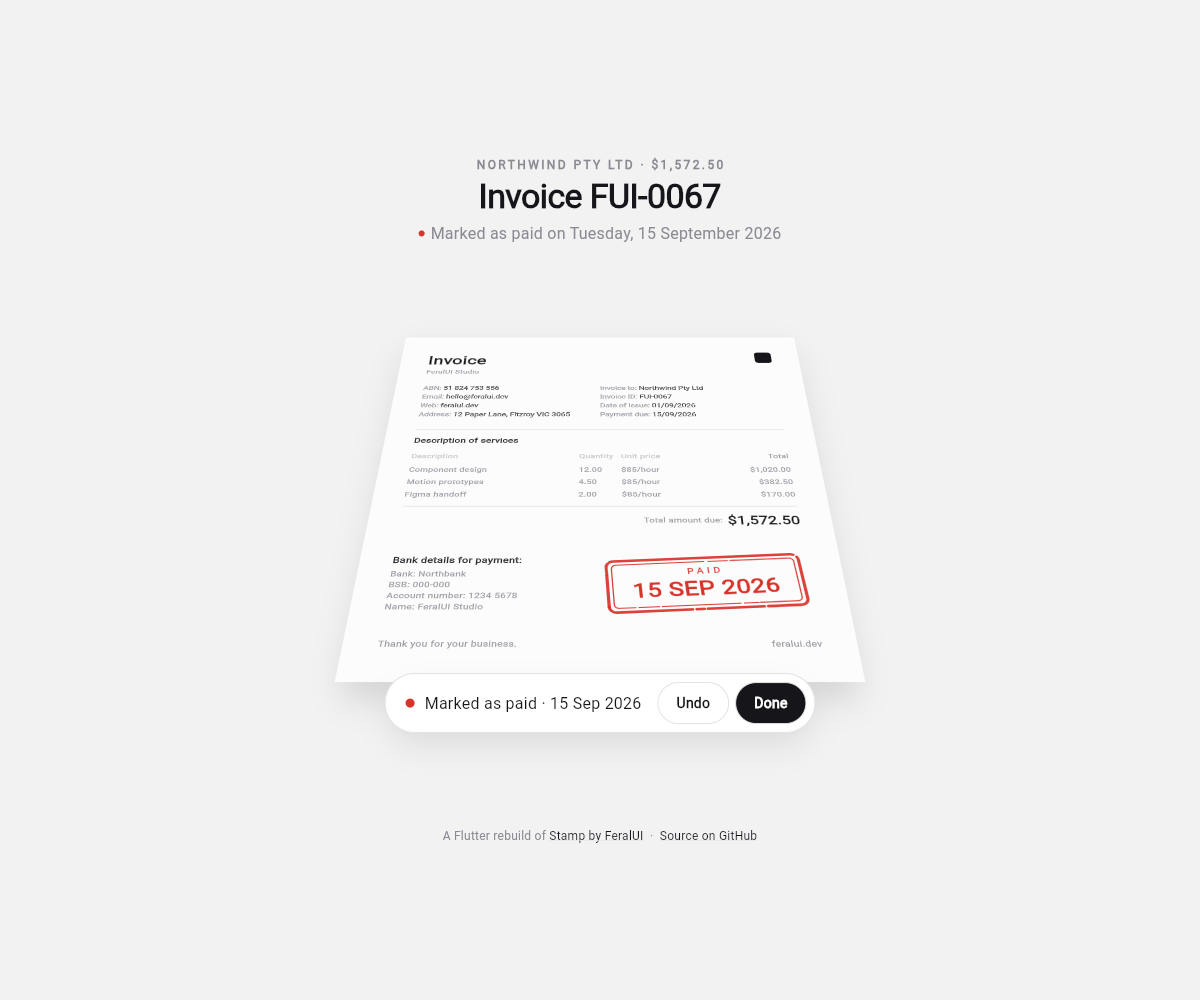
One clock also made other things easy. Undo is _c.reverse(), and the whole press plays backwards with every beat in the right order. The sounds can fire at an exact point on the timeline. And I added a ?t=0.46 URL parameter that sets _c.value directly, so I can freeze the animation on any frame in the browser and look at it properly.
The numbers matched, and it still felt rushed
I used the durations exactly as they were, and my version still felt off. Everything happened too fast, even though every number matched.
The control panel only lists how long each move takes. It says nothing about the pauses in between. Reading them off the original's video, the stamp pauses at the top before it drops, and it rests on the paper for a moment before it lifts. Those pauses are what make it feel heavy. So I added two holds: 150ms at the top, and 200ms on the paper.
The hover was also too low. My stamp started 65 pixels above the page, so a 150ms drop barely went anywhere. In the original it hovers about a third of the page's height up. At 150 pixels, the same 150ms covers real distance and it lands like a slam.
The third problem was sneakier...
The lift beat drives three things in the scene: the little bounce as the rubber springs off the paper, the stamp flying away, and the fade. Each of those shapes the lift with its own curve. A curve is also a function you can call: Curves.easeInCubic.transform(x) takes a progress value between 0 and 1 and gives back a reshaped one. The bounce also squeezes itself into the first third of the lift with lift * 3, and its height is Beat.bounce, the 30% from FeralUI's table:
final bounce =
    Curves.easeOutCubic.transform((lift * 3).clamp(0.0, 1.0)) * Beat.bounce;
final exit = Curves.easeInCubic.transform(lift);
The problem was that lift had already been curved once, on the timeline:
late final Animation<double> _lift = _phase(
  Timeline.liftAt,
  Timeline.lift,
  Curves.easeOutCubic, // later changed to Curves.linear
);
easeOutCubic rushes the start. When a third of the lift's time had passed, lift was already 0.70. So the scene thought the lift was 70% done when it was only a third done, and everything happened early. Here's the difference it made:
| Curved twice | Curved once | |
|---|---|---|
| Bounce finished after | 53ms | 140ms |
| Started fading after | 98ms | 231ms |
| How far it had flown up after 140ms, not counting the bounce | about 150px | about 16px |
It was flying off when it should have still been springing off the paper. The fix was to leave the lift linear on the timeline and do all the shaping in the scene, where each use of it picks its own curve.
Tipping the page back, and one minus sign
Flutter draws everything flat. To make the page look like it's lying on a desk, you do two things to it.
First, you tip it back around a line across its middle, like a mirror on a dressing table swinging on the two pins at its sides. That's rotateX.
Second, you add perspective, which just means things further away look smaller. It's the same reason railway tracks seem to get closer together in the distance. Without it, a tipped page only looks squashed. With it, the far edge shrinks and your brain reads depth.
In code that's a Matrix4:
final camera3d = Matrix4.identity()
  ..setEntry(3, 2, perspective)
  ..rotateX(-angle);
setEntry(3, 2, p) puts p in the one slot of the matrix that tells Flutter to divide every point by 1 + p × depth before drawing it. With p at 0.0009, a point 100 pixels further back gets divided by 1.09, so it's drawn about 8% smaller. Tipped all the way (0.8 radians), the top edge of the page ends up about 170 pixels further back, so it's drawn about 13% smaller than it would be flat. I also multiply p by how far the tilt has gone, so it starts at zero and the stamp is perfectly flat while you pick a date.
In Flutter, y goes down the screen and z goes into it, away from you. With those directions, rotateX with a positive angle swings the top edge towards you. I wanted the top edge to go away, so it needs a negative angle.
My first version said rotateX(angle), without the minus, and it was easy to miss. On its own, a page that's wider at the top still looks like a page. It's a page seen from a different spot, and nothing in one still picture tells you which edge is meant to be near you. When it moves, you can't miss it. The top edge swings up at you as the page leaves flat:
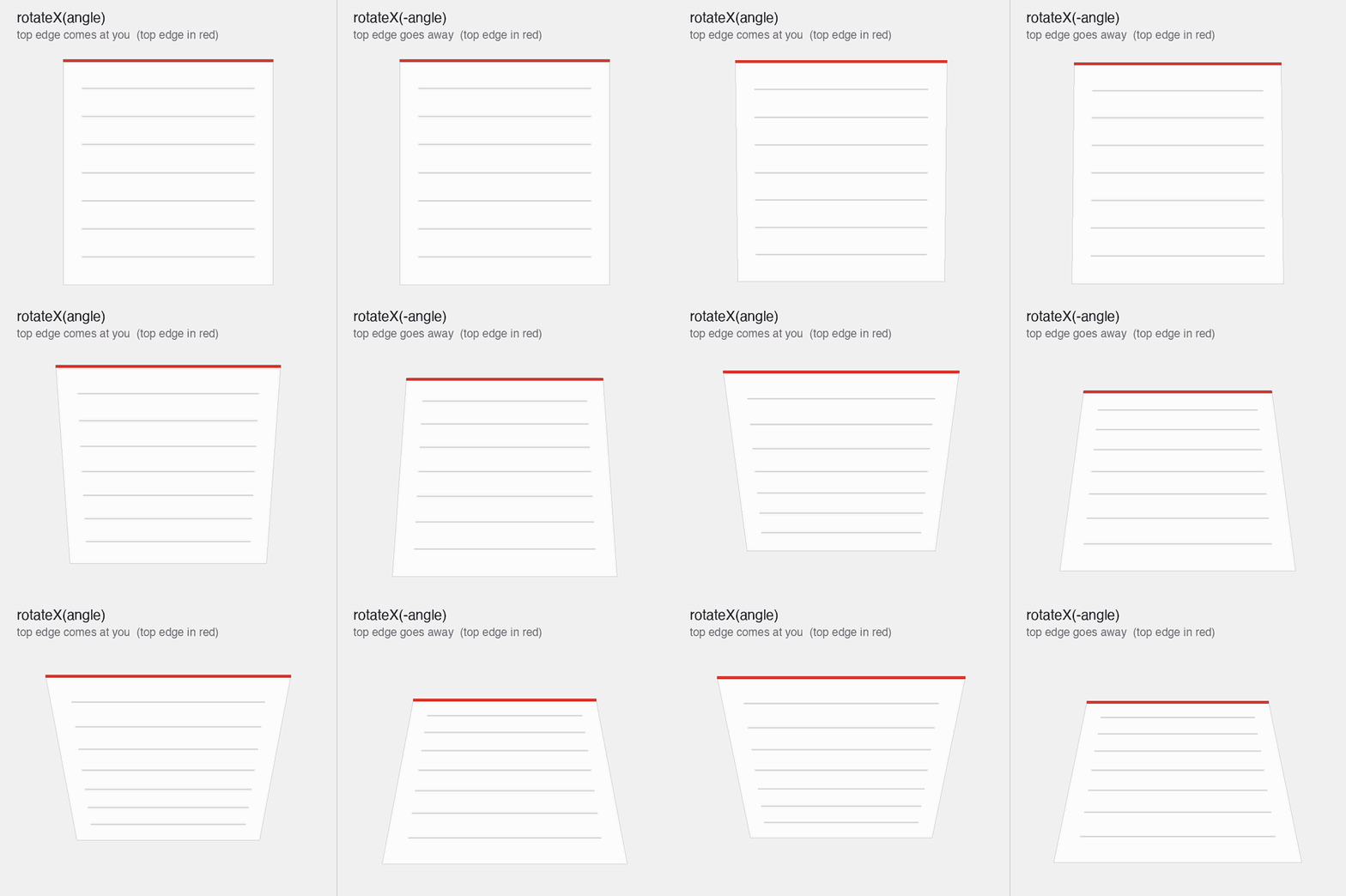
It's an easy thing to flip back by accident, so it has a test. You don't need a screenshot to test this. You can ask the matrix where it puts two points, one above the middle of the page and one below. If the top edge is further away, it should land closer to the middle than the bottom one:
final m = tester.widget<Transform>(find.byKey(cameraKey)).transform;

final top = MatrixUtils.transformPoint(m, const Offset(0, -100));
final bottom = MatrixUtils.transformPoint(m, const Offset(0, 100));

expect(
  top.dy.abs(),
  lessThan(bottom.dy.abs()),
  reason: 'the top edge should be further away than the bottom',
);
One stamp, not two
In the original, the date picker you roll is the stamp. When you press the button, that same card tips over and becomes a block that comes down on the page.
My first try faked it with two separate widgets, a picker and a stamp, crossfading from one to the other. It looked fake straight away. Your eye follows an object, and when it gets swapped for a different one halfway through, you notice, even if you can't say what's wrong.
So there is only one widget. The card you roll the date on grows a body and a rubber pad as the page tips.
Drawing a box when Flutter only draws flat things
This part took the most attempts, by far.
Flutter's widgets have no 3D shapes. Every widget is a flat rectangle. You can tilt a flat rectangle in 3D with Transform, but there's no box to draw, and a rubber stamp is a box. It has sides. These are the actual frames from each attempt, pulled out of the repo's history. The tests draw text as blocks, so look at the stamp, not the words. The last three have no wheels on top because I had taken them off the lid for a while.
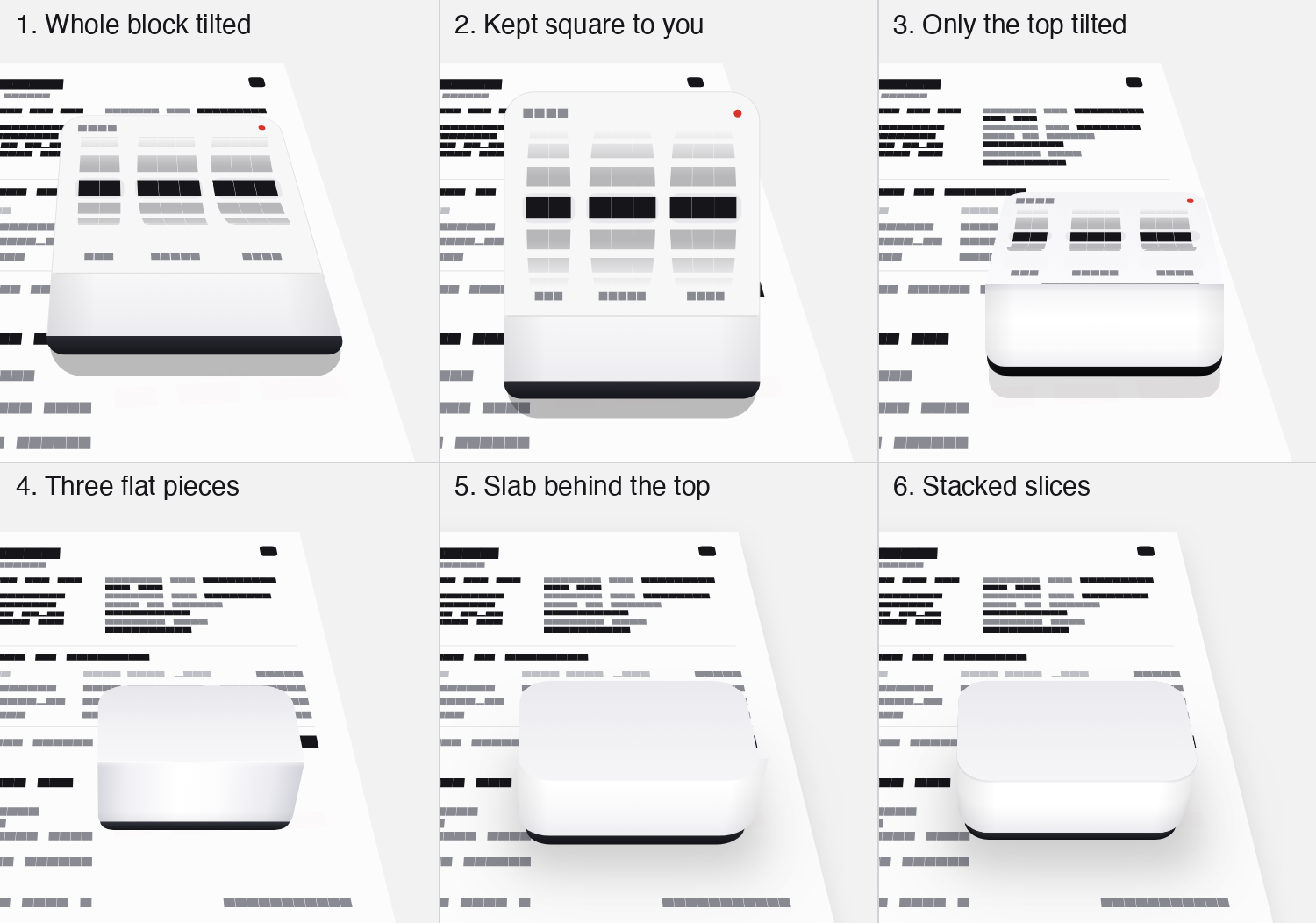
- I tilted the whole block with the page. It squashed into a wedge that swallowed the paper.
- I kept it square to you and faked the volume with a highlight and a shadow. Now it was a flat card sitting on top of the page.
- I tilted only the top face and kept the front face square to you. Better, but the top and the front were drawn two different ways, so they disagreed as the angle changed.
- Three flat pieces (top, front and shadow), all pushed through the same camera. This was the first version that behaved like a real object at every angle, because every piece agreed. But flat pieces make square corners, and the stamp's corners are round.
- A rounded top with a slab behind it that shows through at the corners. The corners came out as square ears, and where the top met the wall it looked like a shelf.
- Stacked slices. This one worked.
Take a stack of coins. Every coin is the same flat circle, but stack enough of them and, from the side, you see a solid cylinder with a smooth round edge. Nobody drew that side. It's just the edges of the coins.
The stamp works the same way. Its outline is a rounded rectangle, so I draw that rounded rectangle again and again, 1.25 pixels higher each time, from the paper up to the top. That's about 110 of them. The bottom one is drawn first, so each new one covers most of the one below. Only a thin strip at the front of each survives, and together those strips make the wall, with round corners from any angle.
Each slice is drawn with the same tilt as the page, lifted h pixels off the paper. Drawing on a canvas has one gotcha. A canvas turns things around its (0, 0) point, the top-left corner, like a sheet of paper pinned at that corner. Rotate it and everything swings around the pin. So for each slice I move the pin to the middle, apply the tilt, then shift my drawing coordinates back by the same amount, so a rectangle drawn from (0, 0) still sits centered on the pin. That's the translate, transform, translate in the middle of the loop. (The Transform widget does the same thing for you when you pass alignment: Alignment.center.)
Trimmed down, the loop looks like this:
for (var i = 0; i <= slices; i++) {
  final h = math.min(i * _step, height); // _step is 1.25

  // The rubber pad at the bottom is a little narrower than the wall.
  // (The real code also curves the wall's base into the pad, and shades
  // each slice with a gradient instead of a flat color.)
  final inset = h < padHeight ? 6.0 : 0.0;
  final rrect = RRect.fromRectAndRadius(
    Rect.fromLTWH(inset, inset, size.width - inset * 2, size.height - inset * 2),
    Radius.circular(math.max(radius - inset, 4)),
  );

  // Same tilt as the page, raised h pixels off the paper.
  final m = camera.clone()..translateByDouble(0, 0, -h, 1);

  canvas
    ..save()
    ..translate(centre.dx, centre.dy)
    ..transform(m.storage)
    ..translate(-centre.dx, -centre.dy)
    ..drawRRect(rrect, Paint()..color = _tone(h))
    ..restore();
}
The -h is there because z points into the screen, so "up off the paper, towards you" is negative. That minus sign again. And camera.clone() matters: ..translateByDouble changes a matrix in place, so without the copy every slice would add its lift on top of the last one.
The colors do the rest. The bottom 13 pixels of slices are nearly black, and that's the rubber pad. Above it, each slice is a gradient that's slightly darker at its left and right ends than in the middle, which is what makes the wall look rounded across. From bottom to top the wall goes from light grey to white, with a little shade right under the top. The top itself is a normal widget pushed up to the full height, which is why you can still roll the date wheels on it.
The stamp also uses half the page's perspective. With the full amount, the stamp swelled by about a fifth as it hovered close to you, and in the original it barely changes size.
Ink that doesn't crawl
A real rubber stamp never prints clean. The ink breaks up along the border where the rubber didn't quite touch the paper. So I draw the border as a path with small gaps cut out of it at random spots.
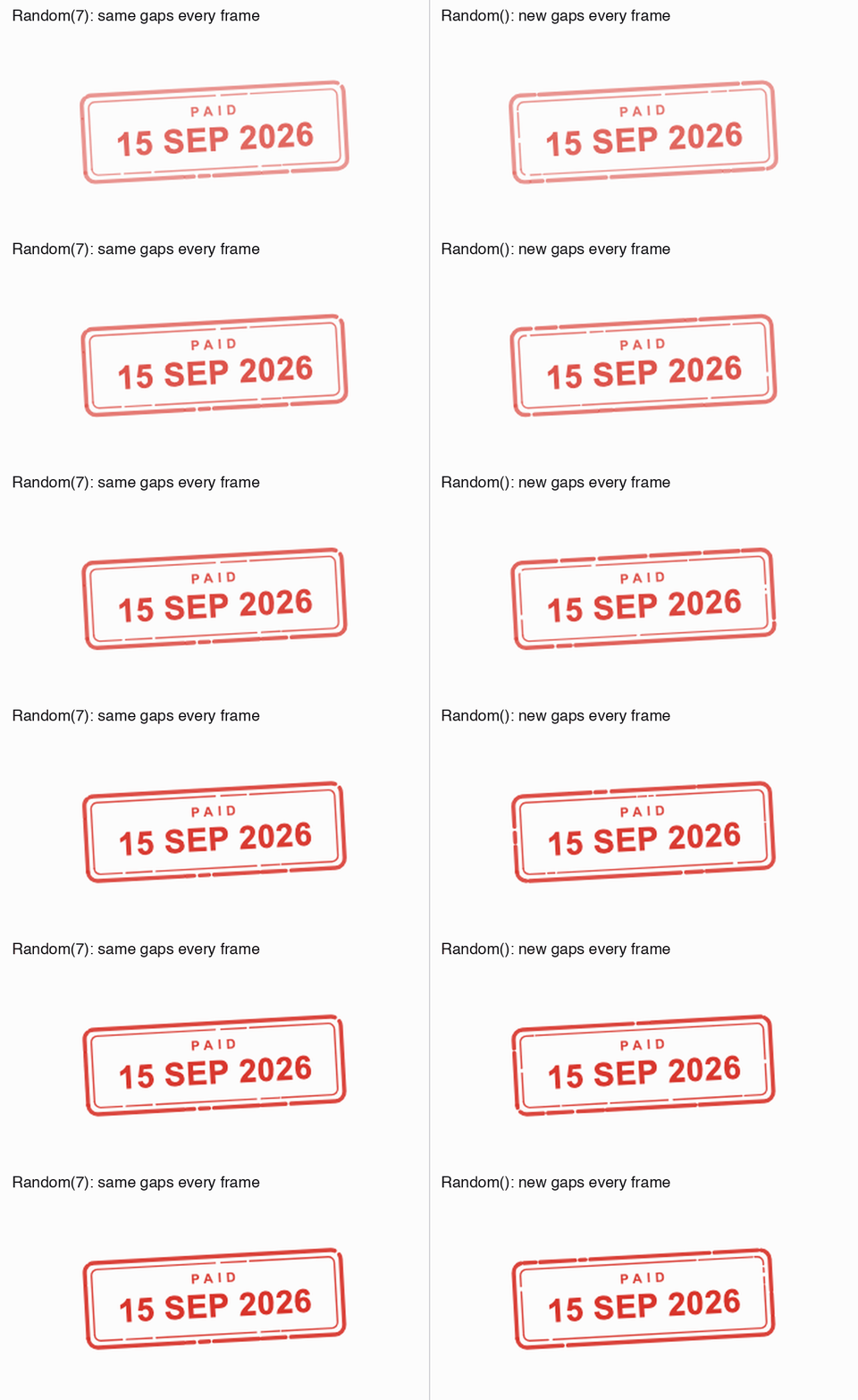
The problem is that Flutter calls paint again on every frame while the ink fades in. With a plain Random(), every frame gets new gaps in new places, and the border looks like it's crawling.
The fix is a seed. A seed is like a shuffled playlist you can replay. Same seed, same "random" order, every time. The gaps still look random, but they're the same gaps on every frame:
/// Fixed seed: the erosion must be identical on every repaint, or the stamp
/// crawls while the ink fades in.
static const _seed = 7;

// paint() passes it down: _eroded(canvas, rrect, ..., seed: _seed)

final rng = Random(seed);
Here's the same mark fading in both ways, slowed down:
The mark also lands a little too big and shrinks back as the ink fades in, like rubber squashing and springing off the paper. settle is how far the ink has faded in, from 0 to 1:
final scale = 1.09 - 0.09 * settle;The thud has to land with the ink
There are four sounds: a tick for the buttons, a clack for each notch as a wheel rolls, a thud when the stamp hits, and three rising notes when it's done. I didn't download any of them. A small Python script in the repo generates all four. The thud, for example, is a low tone that drops quickly in pitch, plus a few milliseconds of noise at the start for the slap.
The thud can't play when you press the button. The stamp doesn't touch the paper until 1.1 seconds later, and a thud on the button press is like hearing a door slam before it has closed. So the sounds listen to the same clock as everything else.
A listener on an AnimationController runs on every frame while it animates, 60 or more times a second. So "has the value passed contact?" is true on every frame after contact, and a sound played on that alone would play again and again. Each sound gets a flag that says it has already played:
_c.addListener(() {
  if (_c.status != AnimationStatus.forward) return;
  if (!_thudded && _c.value >= Timeline.contactAt / Timeline.total) {
    _thudded = true;
    _sound.thud(_stamps);
  }
  if (!_dinged && _c.value >= (Timeline.contactAt + 260) / Timeline.total) {
    _dinged = true;
    _sound.ding(_stamps);
  }
});
_thudded and _dinged are reset every time you press the button, so the next press gets its sounds again. The forward check is a second guard: nothing plays while Undo runs the animation backwards. And Timeline.contactAt / Timeline.total turns "1,100ms in" into a position between 0 and 1, the same way span does.
The mistake I actually made here was about spacing. The finishing notes first played 150ms after contact. The thud is 170ms long, so the notes started before the thud had finished and the two ran into each other. Moving them to 260ms gave the thud room to finish, with a short beat before the notes.
Two bugs that had nothing to do with animation
A mouse couldn't roll the wheels. Touch worked fine. A mouse drag did nothing. By default, Flutter doesn't let a mouse drag a scrollable. Touch, stylus and trackpad are allowed. Mouse isn't. Flutter's docs give the reason: mouse dragging makes it hard, sometimes impossible, to select text inside a scrollable. But on this component you're meant to grab a wheel and roll it, like the real thing, and there's no text in it to select. A custom ScrollBehavior lets the mouse in:
class _DragWithAnything extends MaterialScrollBehavior {
  const _DragWithAnything();

  @override
  Set<PointerDeviceKind> get dragDevices => const {
    PointerDeviceKind.touch,
    PointerDeviceKind.mouse,
    PointerDeviceKind.trackpad,
    PointerDeviceKind.stylus,
    PointerDeviceKind.invertedStylus,
  };
}

// MaterialApp(scrollBehavior: const _DragWithAnything(), ...)
If you copy this, there's a better way to write it. Flutter's default list also includes PointerDeviceKind.unknown, which Android's Voice Access uses to scroll, and my list above drops it. Adding the mouse to the defaults keeps everything else:
@override
Set<PointerDeviceKind> get dragDevices =>
    {...super.dragDevices, PointerDeviceKind.mouse};
The outer wheels wouldn't move. The month wheel in the middle worked. The day and year wheels on either side ignored every touch and every drag.
When you tap, Flutter asks each widget from the top down, "is this point inside you?" Most widgets answer by checking their own size. Transform.scale is different. It changes how its child is drawn, but not the size the widgets above it see.
At rest, the stamp is laid out 216 pixels wide and drawn at twice that, 432. I had wrapped the scale in an Opacity. Opacity checks taps against the size it knows, which is the original 216, the middle half of what you actually see. The month wheel sits in that middle half. The day and year wheels are drawn mostly outside it, so Opacity said "not mine" and the tap never reached them.
It's like a gateman checking visitors against the old list of flats after the building was extended. Anyone visiting one of the new flats gets turned back at the gate.
Transform widgets don't do that size check. They convert the tap into their child's coordinates and pass it down. So the fix was to move Opacity under the scale. By the time Opacity sees the tap, it has already been converted back to the small size, and it lands inside:
// Before (simplified): Opacity sat above the scale.
Opacity(
  opacity: fade,
  child: Transform.scale(scale: exitScale, child: stamp),
)

// After: Opacity sits under it.
Transform.scale(
  scale: exitScale,
  child: Opacity(opacity: fade, child: stamp),
)
I learned this here: if you scale something up with Transform.scale, a wrapper directly above it that takes its size from its child (Opacity, GestureDetector, Padding and so on) only accepts taps inside the original, unscaled size. Put those under the scale instead.
Tools for looking at a fast animation
The press is over in under two seconds, which is too fast to judge by eye. A few things helped.
?slow=12 in the URL slows every animation in the app down twelve times. Flutter has this built in as timeDilation, so it's two lines in main:
final slow = double.tryParse(Uri.base.queryParameters['slow'] ?? '');
if (slow != null && slow > 0) timeDilation = slow;
For a proper frame-by-frame look, I render frames in a test. Automated clicks in the browser didn't reliably reach the Flutter canvas, so instead a widget test taps the button, moves the clock forward to fixed times, and saves each frame as an image. That's where the box attempts above came from.
It uses golden tests. A golden test normally takes a screenshot of a widget and compares it with one saved earlier, to catch visual changes. Run it with --update-goldens and it skips the comparison and saves the screenshots instead, which is all I wanted here. find.byType(MaterialApp) means "screenshot the whole app".
testWidgets('press timeline', tags: 'goldens', (tester) async {
  // Tests draw shadows as flat solid shapes by default. Draw the real thing.
  debugDisableShadows = false;

  // The default 800x600 test window cuts off the button.
  tester.view.physicalSize = const Size(1000, 1100);
  tester.view.devicePixelRatio = 1.0;
  addTearDown(tester.view.reset);

  await tester.pumpWidget(FeralStampApp(sound: StampSound.silent()));
  await tester.tap(find.text('Mark as paid'));
  await tester.pump();

  const marks = <int>[0, 400, 800, 950, 1100, 1250, 1300, 1450, 1720, 2420];
  var elapsed = 0;
  for (final at in marks) {
    await tester.pump(Duration(milliseconds: at - elapsed));
    elapsed = at;
    await expectLater(
      find.byType(MaterialApp),
      matchesGoldenFile('goldens/press_${at.toString().padLeft(4, '0')}.png'),
    );
  }

  await tester.pumpAndSettle();
  // Put it back, or the test fails its own end-of-test check.
  debugDisableShadows = true;
});
That gives you ten pictures of the press to put side by side. Tests draw text in a placeholder font, which is why the words in the box pictures above are blocks.
One last thing that cost me time: Chrome kept serving the old main.dart.js after a rebuild, so the change I had just made wasn't there when I reloaded. python -m http.server doesn't send a Cache-Control header, so Chrome guesses how long to keep files, and it guessed wrong for me. A tiny Python server that sends Cache-Control: no-store fixed it.
Fitting it on a phone
The whole scene is designed at 660 pixels wide. The stamp lands at a fixed spot on the page, and the page sits at a fixed spot under the stamp, so rearranging things for a small screen would break it. On anything narrower, the whole picture gets smaller instead:
final narrow = MediaQuery.sizeOf(context).width < _stageWidth; // 660

if (narrow) {
  stage = FittedBox(
    fit: BoxFit.scaleDown,
    child: SizedBox(width: _stageWidth, child: stage),
  );
}
SizedBox lays everything out at the full 660, then FittedBox shrinks the result to fit the screen, like zooming out on a photo. scaleDown only ever shrinks, never grows, so on a wide screen nothing changes.
What I took away
The fixes that mattered most were small, and most of them only showed up when I used the thing. The wheel bugs appeared the moment I tried to drag with a mouse, the sound overlap was something I heard, and the pauses came from watching the original's video next to mine. So use your version a lot, with a mouse, with the sound on, and next to the original.