
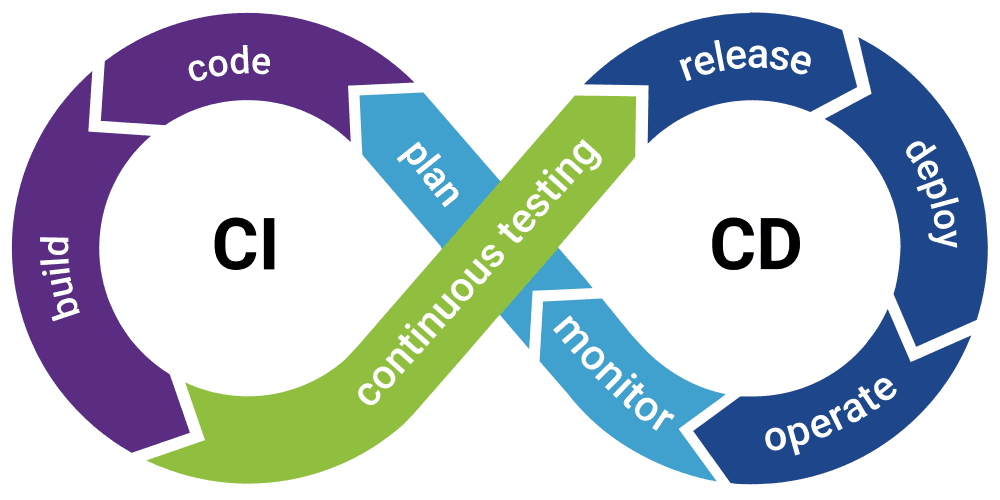
Hey there, tech enthusiasts! Let’s discuss Continuous Integration and Continuous Deployment (CI/CD). Buckle up as we explore how these practices are transforming software development, streamlining the delivery pipeline, and empowering teams to ship high-quality code faster than ever before.
What exactly is Continuous Integration:
Continuous Integration (CI) is the practice of automatically integrating code changes into a shared repository multiple times a day. This allows developers to detect and address integration issues early in the development cycle, leading to faster feedback and improved code quality. I know, technical foo, right😂?
I know, technical foo, right? Here’s what it’s like. CI is like having a tireless assistant who automatically checks your code changes as soon as you push them to GitHub. It’s like having a diligent robot buddy who ensures that your code plays nice with others and doesn’t break anything in the process.
How about Continuous Deployment?
Continuous Deployment (CD), takes CI a step further by automating the deployment process. With CD, code changes that pass through the CI pipeline are automatically deployed to production environments, enabling teams to deliver new features and updates to users quickly and efficiently.
It is like having a magic wand that takes your approved code changes and deploys them to production faster than you can say “Abracadabra!” It’s like having a genie in a bottle who grants your wish for rapid, reliable software delivery.
Benefits of CI/CD?
Why bother with CI/CD, you ask? Well, the benefits are manifold. By automating the build, test, and deployment process, CI/CD reduces manual effort, minimizes human error, and accelerates the release cycle. This results in shorter development cycles, faster time-to-market, and increased agility, allowing teams to respond rapidly to changing market demands and user feedback.
Moreover, CI/CD fosters a culture of collaboration and transparency within development teams. By encouraging frequent code commits, automated testing, and continuous feedback, CI/CD promotes a shared understanding of the codebase and encourages collective ownership of the development process.
Implementing CI/CD
Now that we understand the benefits of CI/CD, let’s talk about how to implement it in practice. The key components of a CI/CD pipeline include version control, automated testing, and deployment automation. Tools like Git, Jenkins, Travis CI, and Kubernetes play crucial roles in orchestrating the CI/CD workflow and automating repetitive tasks.
A typical CI/CD pipeline consists of several stages, including code compilation, unit testing, integration testing, and deployment to staging and production environments. Each stage is automated and triggered by code commits or pull requests, ensuring a smooth and reliable delivery process.
Now, let’s dive into an example with GitHub Actions — a powerful tool for automating CI/CD workflows. Below is an example GitHub Actions workflow for deploying a static website to cPanel:
on:
  push:
    branches: [ "main" ]
    paths-ignore:
      - 'static/sass/'
      - 'README.md'
name: 🚀 Deploy website on push
jobs:
  ftp-deploy:
    name: 🎉 Deploy with FTP
    runs-on: ubuntu-latest
    steps:
    - name: 🚚 Get latest code
      uses: actions/checkout@v2

    - name: 📂 Sync files
      uses: SamKirkland/FTP-Deploy-Action@4.3.3
      with:
        server: ${{ secrets.FTP_SERVER }}
        username: ${{ secrets.FTP_USERNAME }}
        password: ${{ secrets.FTP_PASSWORD }}
Explanation of the above workflow:
- on: Specifies the event that triggers the workflow. In this case, it triggers on any push event to the main branch, but it ignores changes to specific paths such as 'static/sass/' and 'README.md'.
- name: The name of the workflow, indicating that it deploys the website upon push events.
- jobs: Defines one job to be executed as part of the workflow.
- ftp-deploy: Defines a job named "Deploy with FTP" that runs on the latest version of Ubuntu.
- steps: Specifies the sequence of steps to be executed within the job.
- actions/checkout@v2: Action to clone the repository and checkout the code at the specified commit or branch.
- SamKirkland/FTP-Deploy-Action: Action to sync files to an FTP server. It's configured with secrets for the FTP server, username, and password, which are stored securely in GitHub secrets.
With this setup, deploying the static website updates becomes a breeze, ensuring that the latest changes are seamlessly pushed to the production environment without manual intervention.
Best Practices for CI/CD
Some of the best practices for CI/CD include writing automated tests for every code change, keeping the CI/CD pipeline fast and reliable, and monitoring performance and quality metrics. Additionally, fostering a culture of experimentation and continuous improvement is essential for maximizing the benefits of CI/CD and driving innovation within development teams.
In conclusion, CI/CD is more than just a set of practices; it’s a paradigm shift in software development that enables teams to deliver value to users faster, more frequently, and with higher quality. By embracing CI/CD, organizations can stay ahead of the competition, respond to market changes quickly, and delight users with innovative features and updates.