
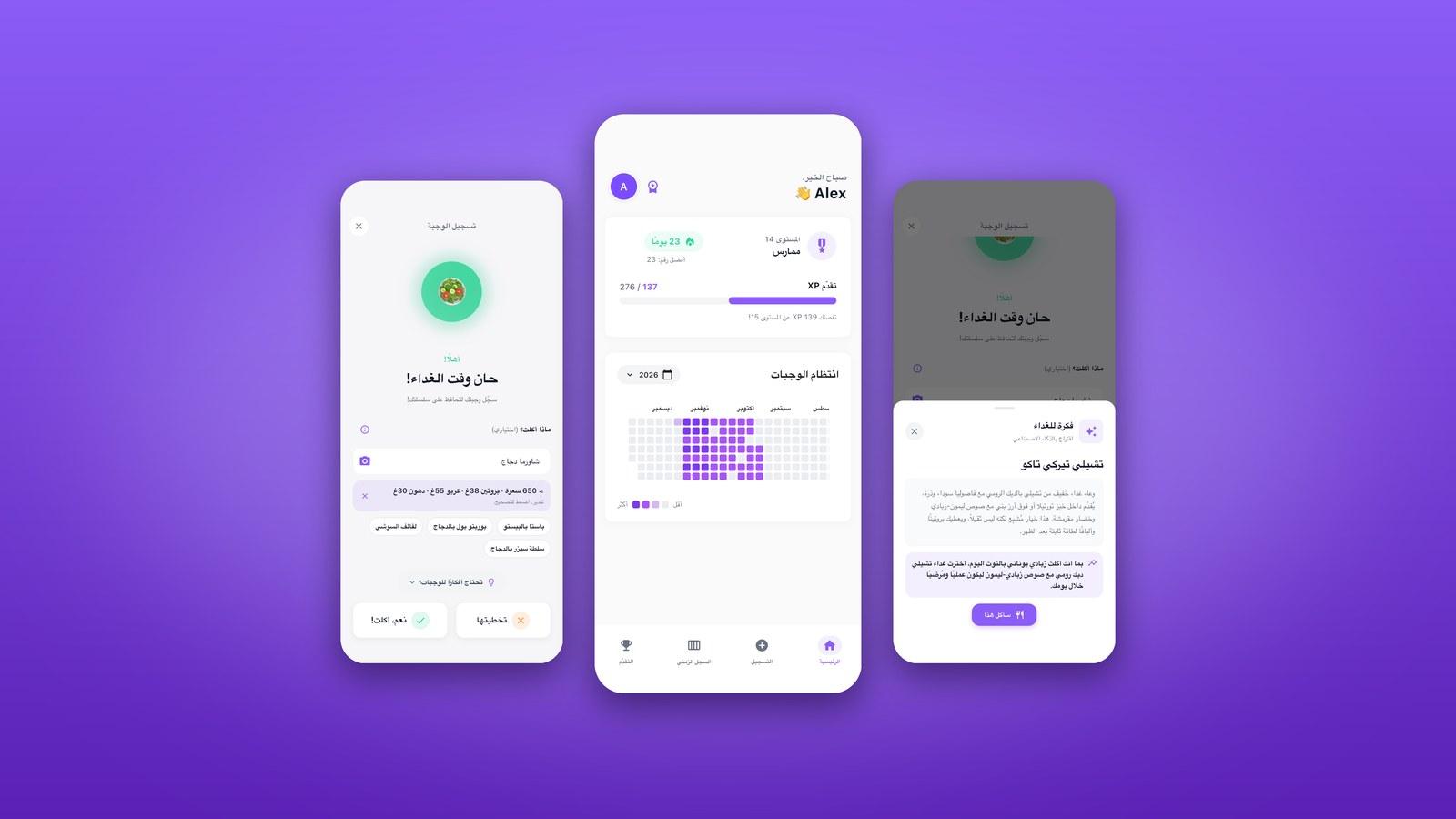
Food Pilot is an iPhone app that reminds you to eat and makes it easy to log what you had. Until this month it only spoke English, with about 600 strings hardcoded across the app.
It now runs in 20 languages, including Arabic and Persian, which read right to left.
Pulling the strings into Flutter's ARB files was tedious but simple. The interesting part is everything that broke afterward.
German broke the layouts
English is short. German isn't. Buttons that fit perfectly in English overflowed as soon as the longer words arrived, and checking 20 languages by hand on every screen wasn't going to happen.
So I wrote a test that renders the tightest widgets in every language on a 375pt phone. Flutter reports an overflow as an error, so any overflow fails the test and names the widget and the language:
for (final locale in AppLocalizations.supportedLocales) {
  for (final MapEntry(key: name, value: widget) in widgets.entries) {
    testWidgets('$name fits in ${locale.toLanguageTag()}', (tester) async {
      tester.view.physicalSize = const Size(750, 1334);
      tester.view.devicePixelRatio = 2;
      addTearDown(tester.view.reset);

      await tester.pumpWidget(/* the widget, in this locale */);
      await tester.pump();

      expect(find.byWidget(widget), findsOneWidget);
    });
  }
}
Flutter's test font draws every glyph as a full square, so it runs wider than real text. That's useful here, because a layout that survives it has room to spare.
It didn't catch everything at first. The Home screen overflowed on my phone because I hadn't added its widgets to the list. Now they're in it.
The AI kept answering in English
Food Pilot suggests meals and estimates calories with an AI model. I told the prompt to reply in the user's language, deep in its list of rules.
In the Arabic app, the replies still came back in English.
The instructions were in English, and a small model drifts back to the language it's reading. Moving the language to the very first line of the prompt fixed it:
export function languageHeader(language: string): string {
  return language === LANGUAGES.en
    ? ""
    : `REPLY LANGUAGE: ${language}. Every text value in your JSON must be written in ${language}, even though these instructions are in English.\n\n`;
}
The language name comes from a fixed list on the server. The app sends a code like ar, and anything unknown becomes English, so a modified request can't slip its own text into the prompt.
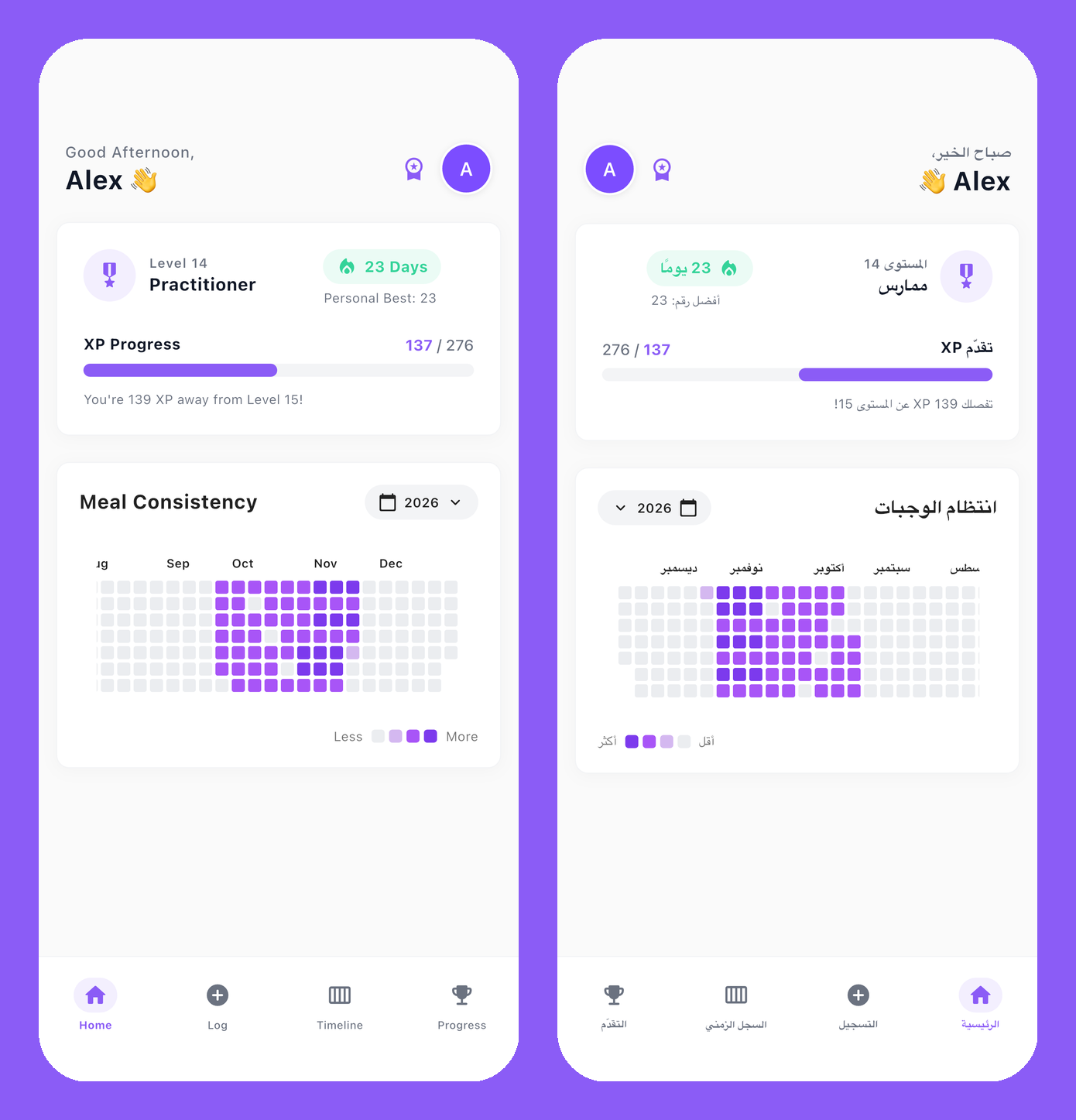
Right to left is more than flipping the screen
Swapping left and right for start and end (EdgeInsetsDirectional, AlignmentDirectional, PositionedDirectional) mirrored most of the app. Two smaller problems took longer to notice.
An English sentence inside an Arabic screen. If an AI reply did come back in English, the Arabic layout put its period on the wrong end. The direction has to come from the text itself:
TextDirection textDirectionOf(String text) =>
    Bidi.detectRtlDirectionality(text) ? TextDirection.rtl : TextDirection.ltr;
Two sets of digits. Dates in Arabic and Persian default to native digits (١٢), while every count and XP number in the app used Western ones. One screen could show both. I picked Western digits everywhere:
for (final locale in const ['ar', 'fa']) {
  DateFormat.useNativeDigitsByDefaultFor(locale, false);
}
Plurals don't work the way English thinks
English has two forms: 1 meal, 2 meals. Russian needs different words for 1, for 2 to 4, and for 5 and up:
"homeStreakDays": "{count, plural, =1{{count} день} few{{count} дня} many{{count} дней} other{{count} дня}}"The trap in Flutter's generator is that =1 and one land in the same slot, so a message can use one or the other but not both. The translations had plenty of messages with both, and I had to clean them out.
The bug I like most was one missing space
The sign-in screen builds its last line from two pieces: "Don't have an account? " and a tappable "Sign up". The space lives at the end of the first string.
The translations for Polish, Russian and Turkish quietly dropped it. So the Turkish screen read:
Hesabın yok mu?Kayıt Ol
Every check passed. The key existed, the placeholders were intact, and nothing overflowed. I only found it because the same mistake showed up in a Turkish screenshot of the day view ("Kahvaltı:Avokadolu tost"). When I wrote a test for that one string, it found the sign-in screens too:
test('$name keeps trailing spaces', () {
  final joined = [
    for (final key in messageKeys(english))
      if ((english[key] as String).endsWith(' ') &&
          arb[key] is String &&
          !(arb[key] as String).endsWith(' '))
        key,
  ];
  expect(joined, isEmpty);
});
Then the App Store rejected my name
I translated the store listing too. App Store Connect refused "Food Pilot" at the start of the localized names, because other apps already use that name in those languages.
Putting the description first worked: "Repas et Calories: Food Pilot" in French, "Essen & Kalorien: Food Pilot" in German. Apple also won't accept the same name twice across your own languages, so each one has to be different.
A few smaller surprises
- iOS only offers a per-app language in Settings once you list your languages under
CFBundleLocalizations. With that in place, I didn't need to build a language picker at all. - iOS permission prompts follow the phone's language, even when the app is set to another one.
- I added Google's translate widget to the landing page, and it translated my support email address.
translate="no"on the link fixed it.
What I'd do from the start next time
- Put every string in an ARB file on day one, even in an English-only app.
- Write
startandend, neverleftandright. - Test layouts in every language automatically. You won't check 20 by hand.
- Treat spaces and punctuation in a string as part of the code.
If you speak one of these languages and something reads wrong, I'd love to hear it: support@foodpilot.app. Food Pilot is free on iPhone at foodpilot.app.