
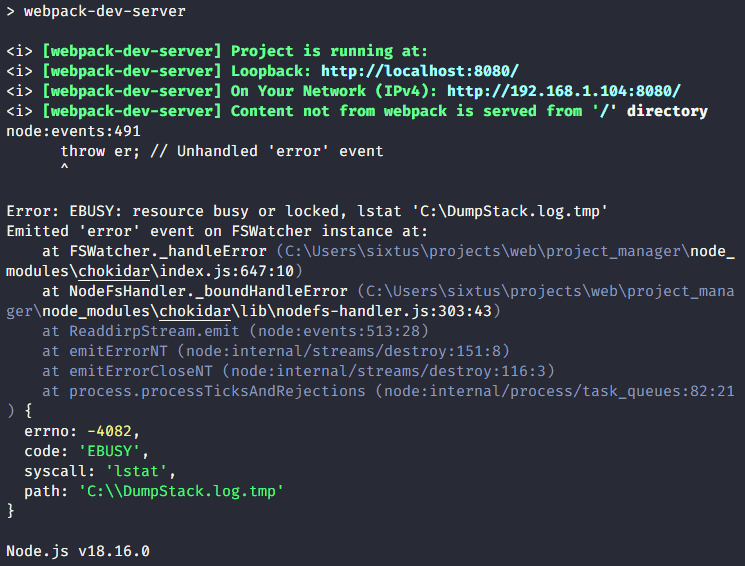
After a lot of googling, from stack overflow to github issues, I finally solved this problem in my project and I decided to write about it to help anyone that might come across the same issue.
I got this issue when trying to run webpack-dev-server, the problem was from my webpack config file, that’s where I had it all wrong. Here’s how it looked like:
const path = require('path');

module.exports = {
  mode: 'development',
  entry: './src/app.ts',
  output: {
    filename: 'app.js',
    path: path.resolve(__dirname, 'dist'),
    clean: true,
    publicPath: './',
  },
  devServer: {
    static: '/',
    compress: true,
    host: '0.0.0.0',
    port: 8080,
    devMiddleware: {
      index: true,
      mimeTypes: { phtml: 'text/html' },
      publicPath: './',
      serverSideRender: true,
      writeToDisk: true,
    },
  },
  // ...
}
The devServer.static property makes webpack to look for static files, in the path / which makes chokidar (a module which webpack depends on). Now, you might be wondering, well what’s wrong with that since / is the root directory of my project. But, / actually refers to the root directory of my system which in this case is the C: directory because I am on windows. Then, chokidar tries to watch the files in the C: directory and that fails because it doesn’t have the appropriate file permision to do that. Hence the error Error: EBUSY: resource busy or locked, lstat ‘C:\DumpStack.log.tmp’
What did I do then?
Moving on, I tried to find the log file C:\DumpStack.log.tmp first because I thought I could fix it by elevating permissions on the file but I couldn’t. Then, I restarted my PC, trivial but effective at times. Still that didn’t work, that was when I opened my browser and searched for it. I tried a lot of approaches from StackOverFlow, things like: deleting the node modules directory and clearing npm cache with npm cache clean before running npm install again but that didn’t work and even uninstalling nodejs and reinstalling it again. Then I started going through various github issues related to the bug and it appears many others have encountered it too from chokidar through other packages or sometimes vs code extension. The most important one was this vscode-cmake-tools issue:
It was what gave me the idea I used to solve it. I figured out that I had to provide an absolute path for the devServer.static property by passing ./ instead. Here’s the fixed one — the complete webpack config file:
const path = require('path');

module.exports = {
  mode: 'development',
  entry: './src/app.ts',
  output: {
    filename: 'app.js',
    path: path.resolve(__dirname, 'dist'),
    clean: true,
    publicPath: './',
  },
  devServer: {
    static: './',
    compress: true,
    host: '0.0.0.0',
    port: 8080,
    devMiddleware: {
      index: true,
      mimeTypes: { phtml: 'text/html' },
      publicPath: './',
      serverSideRender: true,
      writeToDisk: true,
    },
  },
  devtool: 'inline-source-map',
  module: {
    rules: [
      {
        test: /\.ts$/,
        use: 'ts-loader',
        exclude: /node_modules/,
      },
    ],
  },
  resolve: {
    extensions: ['.ts', '.js'],
  },
};
Thanks for reading, it’s my first article on Medium😑.